Four Simple Steps
Upload Records
Drop your medical documents into DPI. Accepts PDFs, images, scanned records, typed notes, and advanced hospital formats (ZIP archives, CCD/CCDA, HL7 exports) from any provider. Simply drag and drop your files - DPI handles the rest.
Automatic Processing
DPI extracts text, removes identifying information, and organizes everything chronologically. All processing happens on your computer. Now handles complete hospital reports up to 1000 PDF pages.
AI Analysis
Choose to run AI-powered analysis when you're ready. DPI identifies patterns, highlights abnormalities, and generates insights.
Review Results
Get clear, organized summaries in plain English. Export reports and findings.
❌ Before DPI
- Spend hours reading documents manually
- Struggle with medical terminology
- Miss important patterns
- Can't find specific information quickly
- Difficult to see changes over time
- Hard to summarize for doctors
- Overwhelmed by volume
✅ With DPI
- Analysis completed in minutes
- Plain-English explanations
- AI identifies concerning patterns
- Professional summaries ready to share
- Organized and actionable
What DPI Produces
🔍 Pattern Analysis
- Abnormal findings highlighted
- Trends in lab values identified
- Correlations between symptoms and tests
- Potential concerns flagged
📝 Plain-English Summaries
- Medical terms explained
- Key findings emphasized
- Executive summary for quick review
💡 Actionable Insights
- Suggested follow-up questions
- Areas needing clarification
- Missing information identified
- Important trends highlighted
📊 Blood Work Timeline
NEW IN V9.2- Automatic extraction from records
- Organized by panel type (Thyroid, CBC, etc.)
- Out-of-range values highlighted
- Export to Excel spreadsheet
🔍 Hypothesis Reconciliation
NEW IN V9.2- Multi-pass diagnostic review process
- Cross-validates findings across analyses
- Identifies inconsistencies and conflicts
- Ensures comprehensive evaluation
✅ Final Review Audit
NEW IN V9.2- Quality control pass before final report
- Verifies all findings are evidence-based
- Flags any uncertain conclusions
- Ensures accuracy and completeness
Blood Work Timeline
Track your lab results automatically across all your medical records
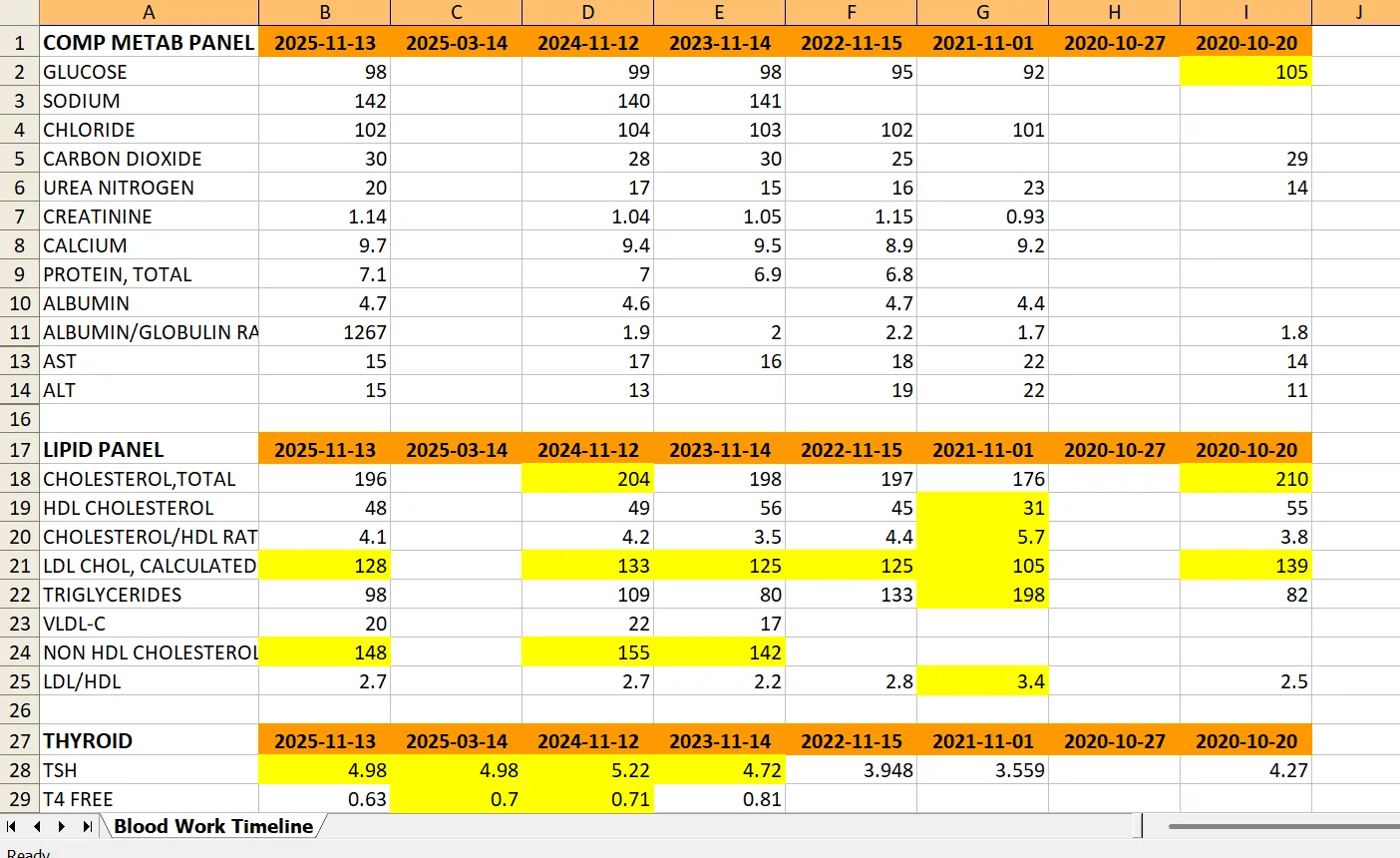
Example: Comprehensive Metabolic Panel, Lipid Panel, and Thyroid tests tracked across multiple dates. Out-of-range values automatically highlighted in yellow.
How Credits Work
🎁 First 100 Users (Limited Time)
- • Download DPI and launch for the first time
- • 10 credits automatically loaded to your account
- • No credit card required
After First 100 Users
- • DPI starts with 0 credits
- • Purchase credits anytime: Open DPI → Replenish menu → Select package → PayPal
- • Credits added instantly and never expire
Credit Packages
Starter: $10 for 10 credits ($1.00 per credit)
Value: $25 for 30 credits ($0.83 per credit - Save 17%)
🔒 Your Privacy Is Protected
- Privacy-First Design: Files are processed and anonymized on your computer before any AI analysis
- Automatic Anonymization: Personal identifiers (names, dates, addresses) removed before AI sees anything
- Original Records Stay Local: Your unmodified medical records never leave your machine
- No Cloud Storage: We don't store your medical information on our servers
- HIPAA-Aware: Designed with healthcare privacy regulations in mind
The Technology Behind DPI
Document Processing
OCR (Optical Character Recognition): Extracts text from scanned documents and images using Tesseract, an industry-standard open-source engine.
Anonymization
Pattern Matching & NLP: Identifies and removes personal information (names, DOB, addresses, phone numbers) before any external processing.
AI Analysis (Optional)
Large Language Models: Uses Microsoft Azure OpenAI GPT-4 to understand medical terminology, identify patterns, and generate insights.
Local Storage
All Files: All documents and analysis results stored locally on your computer.
Accepted Document Types
📄 PDF Documents
- Lab reports
- Doctor's notes
- Imaging reports
- Discharge summaries
🖼️ Images
- Scanned documents
- Photos of records
- Screenshots
- JPG, PNG, TIFF formats
📊 Structured Data
- Lab result spreadsheets
- Portal exports
- CommonHealth downloads
- CSV, Excel files
📝 Text Files
- Typed notes
- Email records
- Portal messages
- TXT, DOCX files
System Requirements
Supported Platforms
- Windows: Windows 10 or later
- macOS: macOS 10.15 (Catalina) or later
- Linux: Ubuntu 20.04 or compatible distributions
Internet Connection
- Required for: License verification, AI analysis, purchasing credits
- Not required for: Document upload, organization, viewing local records
Disk Space
- Application: ~300 MB
- Documents: Depends on your medical records (typically 100-500 MB per patient)